autoBuilder, a PROS library for writing autonomous routines
A tool we used to write 21 autonomous routines for our High Stakes robot is now a PROS library. A team supplies command templates and one function that reports its robot's state, and the library prints the finished code.
- Team
- VEX Team 2147Z robot code
- Role
- Author
- Period
- Apr 2025 to Oct 2026
- Code
- C++ on PROS
- Input
- A list of command templates and one state function
- Output
- Code printed to the PROS terminal and a brain screen console
- Screens
- robodash console and image views
The problem
Writing an autonomous routine by hand means guessing a coordinate, running it, and correcting the number after the robot misses. During the High Stakes season I built a tool into our robot code to remove the guessing. I push the robot to a spot with odometry running, pick a command on the controller, and press A. The matching LemLib call prints to the terminal with the robot's live position already filled in. We used it to write 21 autonomous routines that season.
Watch a routine get built
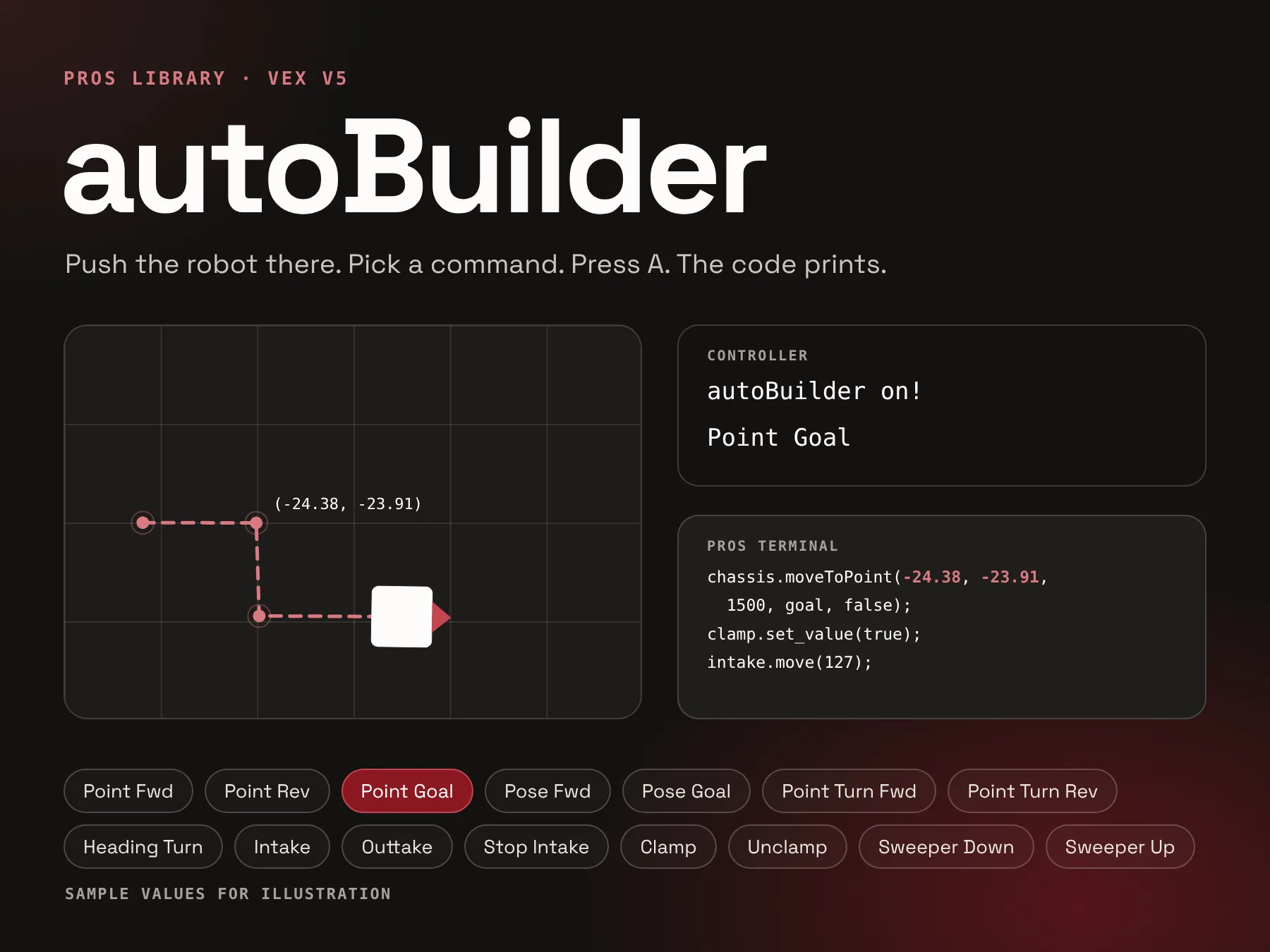
This is the example setup from the repository building a short routine. Each time the robot is moved, left and right on the controller cycle through the command names and A prints the line. The controller rumbles when A is pressed. Commands that need no position, such as the clamp, only use their name. The output is plain C++ statements, so it is pasted into the autonomous function and tuned from there.
chassis.moveToPoint(-24.38, -23.91, 1500, goal, false);
clamp.set_value(true);
intake.move(127);
chassis.moveToPoint(-23.64, -46.52, 1500, regularPoint, false);
chassis.turnToHeading(91.83, 500, headingTurn, false);
chassis.moveToPoint(11.85, -46.71, 1500, regularPoint, false);
clamp.set_value(false);
intake.move(0);
Why it only worked for our robot
When I pulled the tool out of our robot code in April 2025, it was tied to our robot in three places. The button handling sat in main.cpp. Each command was a C++ function that built its string from our chassis object, our motion settings, and our subsystem names. And the code read our chassis pose directly. A team that wanted it would have had to read our code and rewrite most of it.
//aliases for cleanliness
lemlib::Pose chassisPose = chassis.getPose();

struct Command{
	std::string name;
	std::function<std::string()> codeGen;
};

int abIndex = 0;
std::vector<Command> commands = {
    {"Point Fwd", []() {
        return std::format("chassis.moveToPoint(%f, %f, 1500, {.maxSpeed = 100, .minSpeed = 20, .earlyExitRange = .05}, false);", chassisPose.x, chassisPose.y);
}},Making it modular
I wanted another team to be able to drop this into a project of their own, so I moved everything specific to our robot out of the library and into data the team passes in. It took three steps. In April 2025 I moved the button logic into an autoBuilder class that takes a command list and a controller. In May 2025 I removed the class's last link to the chassis and packaged it as a PROS template, version 1.0.0, which a project adds like any other library. The current version replaces the code-writing functions with plain strings.
The result is that the library knows nothing about a drivetrain. It reads the controller, fills in a template, and prints it.
What a team provides
A team gives autoBuilder three things. The first is a list of commands, each a name for the controller screen and a string with {key} fields. The second is a snapshot function that returns the values those fields can use, as names and numbers. The third is its controller and the brain screen views. When A is pressed, the library calls the snapshot once, fills every field, and prints the result. A field with no matching name is left as written.
Our setup reports the three values LemLib tracks: x, y, and theta. A team on another library, or one with more sensors, can report whatever its templates need, such as a lift angle or a distance reading, by adding it to the same function.
struct Command {
  std::string name;
  std::string tpl; // e.g. "go({x}, {y});" - {key} filled from the snapshot
};

// name -> value, read fresh on every button press
using State = std::unordered_map<std::string, double>;

autoBuilder(std::vector<Command> commands, pros::Controller *controller,
            rd::Console* console, rd::Image* image, std::function<State()> snapshot,
bool startingState = false);// Everything templates can reference as {key}. Add other subsystems here.
autoBuilder::State snapshot() {
auto p = chassis.getPose();
return {{"x", p.x}, {"y", p.y}, {"theta", p.theta}};
}Try it
Drag the robot or move the sliders to change what the snapshot reports, pick a command or edit its template, and press A. The lift key and the Lift To command are not in the repository example. They are here to show a team adding its own value to the snapshot and using it in a template. A field the snapshot has no name for stays as written, as it does in the library.
chassis.moveToPose(-24.38, -23.91, 271.46, 1500, regularPose, false);Under the hood
Two functions do the work. run() checks the controller every 100 ms. Left and right move through the command list, and A rumbles the controller, fills the current template, and prints the result to the terminal and to the brain console. render() reads one snapshot and fills every field in a single pass over the template string.
if (controller->get_digital_new_press(pros::E_CONTROLLER_DIGITAL_RIGHT)) {
  controllerIndex = (controllerIndex + 1) % commands.size();
  controller->print(2, 0, "%-16s", commands[controllerIndex].name.c_str());
}

if (controller->get_digital_new_press(pros::E_CONTROLLER_DIGITAL_A)) {
  controller->rumble(".");
  std::string code = render(commands[controllerIndex].tpl);
  printf("%s\n", code.c_str());
  console->printf("%s\n", code.c_str());
}State state = snapshot();
std::string out;
for (size_t i = 0; i < tpl.size();) {
size_t end = tpl[i] == '{' ? tpl.find('}', i) : std::string::npos;
auto it = end == std::string::npos ? state.end() : state.find(tpl.substr(i + 1, end - i - 1));
if (it == state.end()) {
out += tpl[i++];
continue;
}
char buf[32];
snprintf(buf, sizeof buf, "%.2f", it->second);
out += buf;
i = end + 1;
}
return out;Result
The first version helped us write 21 autonomous routines in the 2024-25 season. The library version is public on GitHub, and its PROS template reached version 1.0.0 in May 2025.

